
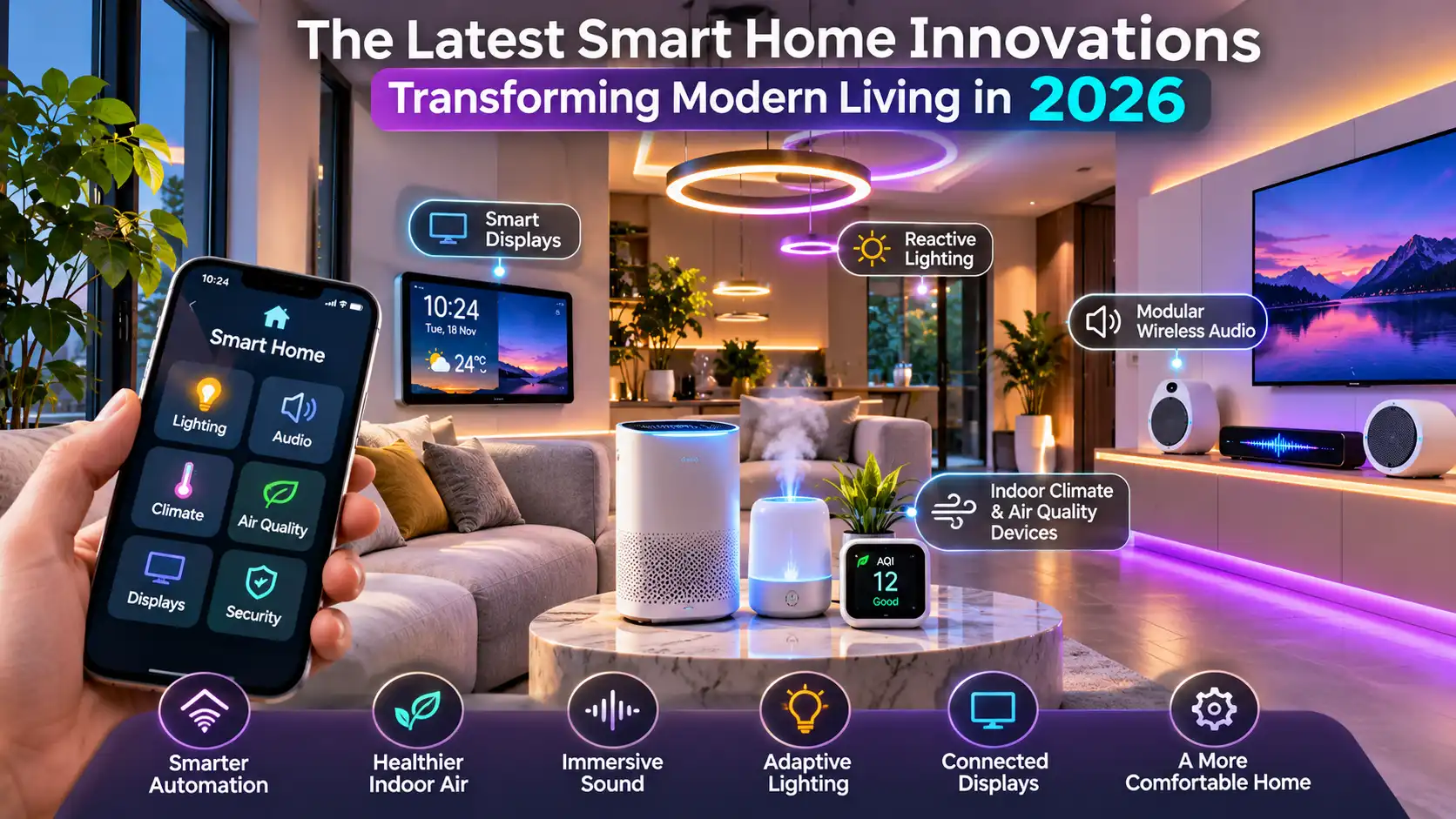

The most interesting smart homes are not the ones with the most gadgets. They are the ones where technology quietly takes care of the small things, leaving people with a home that feels comfortable, responsive and genuinely theirs.

Smart home technology is moving beyond isolated connected products. Displays are becoming household control points, wireless audio is easier to expand room by room, lighting is responding to activity and entertainment, and indoor climate devices are giving households a clearer picture of the air they breathe.
Smart homes are becoming more thoughtful, not just more connected
There was a time when a smart home meant being able to switch on a bulb from a phone. It was a neat party trick, but it did not necessarily make everyday life easier. In 2026, the more useful question is different: can the home understand what is happening and respond in a way that makes sense?
Think about arriving home on a hot afternoon. A well-planned setup might have already adjusted the cooling, opened the curtains to a comfortable position and switched on a soft entry light. Later, when the television starts, the room can move into an entertainment scene. None of this needs to feel theatrical. The best automation is often the sort you stop noticing because it simply works.
That shift depends on several layers working together: sensors, connected devices, a reliable home network, a central platform and routines that reflect how people actually use their rooms. It also requires restraint. Automating every switch is not the same as designing a good experience.
1. Smart displays are turning into the household control centre

Smart displays have grown beyond being voice assistants with a screen attached. A useful display can bring together the family calendar, weather, door camera, music, timers and the controls for connected lights or thermostats. Instead of opening several apps, someone can glance at one screen and understand what is happening around the home.
The most practical place for a shared display is usually somewhere people naturally pass through, such as a kitchen counter, hallway shelf or living room console. A wall-mounted screen can look tidy, while a portable tabletop model gives more flexibility. The choice depends on whether the household needs a permanent dashboard or a device that can move between rooms.
In a busy household, the calendar and reminder functions can be just as useful as device controls. A shared screen might show school timings, grocery reminders and the next appointment. Video calling can also make a display useful for checking in with family without reaching for a phone.
What makes a display worth buying?
Clear at a glance
Choose a screen that is readable from the distance where it will be used. A beautiful interface is less helpful if the text is tiny.
Useful integrations
Check whether it works with the lights, cameras, speakers and climate devices already in the home.
Privacy controls
Look for camera shutters, microphone controls, account permissions and clear settings for stored voice or video data.
Reliable updates
Software support matters. A display is part of the home’s control system, not a disposable novelty.
One detail often missed during setup is placement. A screen facing a bright window may suffer from reflections, while a display placed too close to a cooking area can collect grease and steam. Keep it visible, reachable and away from avoidable heat or moisture.
2. Modular wireless audio makes whole-home listening easier

Wireless audio has become more flexible because households no longer have to plan every speaker position around a long cable run. A soundbar can handle television audio, compact speakers can be added to a study or bedroom, and compatible products can be grouped for music across several rooms.
The word modular is important. Rather than buying a complete multi-room package on day one, a household can begin with one good speaker and expand as its needs become clearer. A small apartment may only need a living-room soundbar and a kitchen speaker. A larger home might benefit from separate listening zones, with the option to play the same track throughout the house.

There are practical details to check before mixing products. Multi-room playback may depend on the manufacturer’s app, supported streaming services, Wi-Fi quality and whether devices belong to the same ecosystem. Bluetooth is convenient for a single nearby connection, but it is not always the best foundation for synchronised audio across several rooms.
Build a system around the way you listen
- Television first: prioritise dialogue clarity, HDMI eARC support and a soundbar that suits the room size.
- Music throughout the home: check multi-room grouping, synchronisation and support for your preferred streaming services.
- Small rooms: compact speakers can be more sensible than large units that dominate the space.
- Expandable setup: confirm that additional speakers can join the same system before investing in the first device.
Placement still matters more than marketing claims. A speaker pushed into a corner may sound boomy, while one hidden inside a cabinet can lose clarity. Give each unit some breathing room and test it from the seats where people actually listen.
3. Reactive lighting is making rooms feel more alive

Reactive lighting is more than changing a bulb from white to purple. It describes lighting that responds to a cue: the time of day, a movement sensor, a television picture, music or a selected scene. When it is designed carefully, it can change the mood of a room without requiring someone to adjust several switches every evening.
For example, a reading scene might use a focused warm-white lamp while keeping the rest of the room softly lit. A film scene could dim the main lights and activate subtle bias lighting behind the television. A night-time pathway routine might use low-level lights triggered by movement, rather than switching on the full ceiling lighting.

There is a design principle worth remembering: colour should support the room, not compete with it. A strong blue or magenta strip can look striking in a gaming area, but it may be tiring as the only light source in a space used for reading or relaxing. Layered lighting works better. Combine ambient light, task lighting and accent lighting, then use automation to adjust their balance.

Useful reactive lighting routines
Morning fade-in
Gradually raise bedroom lighting at a chosen time instead of switching on a bright ceiling light all at once.
Movie mode
Dim the main lights and keep a gentle glow behind the screen to make viewing more comfortable.
Motion pathway
Use a motion sensor to activate low-level hallway lighting after dark, with a short timeout.
Music scene
Let compatible lights respond to music when the household wants an energetic atmosphere.
Before buying, check whether the system uses smart bulbs, smart switches, LED strips or a dedicated lighting controller. Smart bulbs offer colour flexibility, but a wall switch that cuts their power can make them unavailable to the automation system. Smart switches can be more practical for shared spaces, provided the wiring and lighting circuit are compatible.
4. Indoor climate and air quality devices are becoming more informative

Comfort is not only about the temperature shown on a thermostat. Humidity, ventilation and airborne particles can all influence how a room feels. That is why indoor climate technology is becoming a more visible part of the connected home, particularly in cities where outdoor pollution, seasonal dust and changing weather can affect the indoor environment.
Different devices measure different things. A temperature and humidity sensor reports basic room conditions. A CO2 monitor can help indicate whether a space may need more fresh air, although it does not measure every pollutant. A particulate sensor may report PM2.5 levels, while an air purifier uses filters to capture particles as air passes through it. These products have related jobs, but they are not interchangeable.
For a family working or studying from home, a monitor can make ventilation decisions less of a guessing game. If CO2 rises in a closed room, opening a window or improving ventilation may help. If particulate readings increase, the household can investigate likely sources and consider whether filtration is appropriate. The readings should be treated as useful indicators, not as a complete laboratory assessment of indoor air.
Understand the numbers before automating them
| Device or reading | What it tells you | What it cannot tell you alone |
|---|---|---|
| Temperature sensor | How warm or cool the measured location is | Whether every room feels equally comfortable |
| Humidity sensor | Relative moisture level in the air | Whether there is hidden damp or mould behind a wall |
| CO2 monitor | Can indicate when a room may need better ventilation | It is not a complete measure of indoor air quality |
| PM2.5 monitor | Tracks fine particulate matter in the measured air | It does not identify every chemical or gas |
| Air purifier | Filters air that passes through its filtration system | It does not replace source control or fresh-air ventilation |
Placement affects readings. Avoid putting a sensor directly beside an open window, an air-conditioner outlet, a kitchen hob or the purifier’s exhaust. Those positions may produce readings that do not represent the room as a whole. A central, unobstructed location is usually a better starting point, subject to the manufacturer’s guidance.
For households in Delhi and other cities with seasonal pollution, it can be useful to combine indoor monitoring with sensible ventilation habits. On days when outdoor air is poor, keep windows closed where appropriate and use suitable filtration. When outdoor conditions improve, ventilation can help refresh indoor air. No single gadget can make every indoor environment healthy on its own.
5. The real innovation is how these systems work together

Individual devices are useful, but the bigger change comes when they share information. A motion sensor can trigger a hallway light. A thermostat can respond to occupancy. A display can show the status of a door sensor. A speaker can announce a reminder. The household begins to feel like one connected system rather than a collection of unrelated gadgets.
Interoperability is therefore an important buying consideration. Matter is an industry standard designed to help compatible smart home products work across supported ecosystems. It can make device selection less restrictive, but the Matter logo does not mean every feature works with every controller. Thread, Wi-Fi, Bluetooth commissioning, device categories and software support still matter. Always check the exact model and the functions supported by the platform you plan to use.
It is also worth deciding where automations should run. Some systems rely heavily on cloud services, while others can keep selected routines running locally. Local control can improve resilience when the internet connection drops, although remote access and some advanced features may still need a cloud connection.
A simple example of a joined-up routine
Imagine a household leaving for work. A single departure routine could switch off selected lights, lower the thermostat, pause music and arm compatible security sensors. In the evening, an arrival routine might restore a comfortable temperature and turn on the entry light. These actions should always include sensible exceptions, such as a family member staying home or a pet moving around the house.

The point is not to automate everything. It is to remove repetitive tasks without creating new problems. A good routine is predictable, easy to override and simple enough for every member of the household to understand.
6. What should you prioritise when planning a smart home?
It is tempting to start with the most impressive product in a shop window. A better approach is to start with a daily frustration. Is the hallway too dark at night? Does the living room get uncomfortable in the afternoon? Is it difficult to manage music across rooms? Do family members need a shared place to see reminders?
Once the problem is clear, choose the smallest reliable solution. A sensor and one smart bulb may be enough for a hallway. A smart display may solve the family calendar problem. A single air quality monitor can help you understand a room before you spend money on several devices.
| Innovation | Best starting point | Check before purchase |
|---|---|---|
| Smart displays | One shared household dashboard | Privacy controls, integrations and update support |
| Modular wireless audio | One speaker or soundbar in the main room | Multi-room compatibility and network stability |
| Reactive lighting | One room with two or three useful scenes | Bulb, switch and controller compatibility |
| Climate and air quality | One well-placed monitor in a frequently used room | Which pollutants or conditions it actually measures |
These scores are simply a visual prompt for thinking about household priorities. A family with young children may value reminders and lighting routines more highly. Someone working from home may put indoor climate monitoring first. There is no universal ranking that suits every floor plan or budget.
7. Watch a smart home setup in action
A video walkthrough can make the relationship between connected devices and everyday routines easier to picture. The video below is included as a visual companion to this guide. Use it to consider which ideas would genuinely fit your own rooms and routines.
If the player is unavailable in your browser, watch the video on YouTube.
8. Security, privacy and reliability deserve equal attention
A connected home collects information about routines, occupancy and sometimes audio or video. Before installing a camera, voice assistant or smart display, check what information is stored, where it is processed and how long it is retained. Use strong, unique passwords, enable multi-factor authentication where available and keep device firmware updated.
Separate guest access from administrator access where the platform allows it. Review old user accounts when someone no longer needs access. For cameras, think carefully about the field of view and avoid recording private spaces unnecessarily. A convenient device should not create a privacy problem for the people who live in the home.
Reliability is just as important. A light switch should still have a sensible manual control. Essential locks and safety equipment should not depend on a fragile automation. Keep the router and hub in a ventilated location, update them regularly and make sure the household knows what to do if the internet connection fails.
9. A more sensible route to a future-ready home
The smartest purchase is often the one that solves a real problem and remains useful after the excitement of installation has passed. Start with a reliable network, select a platform that supports the devices you want, and add products gradually. Keep a simple record of device names, rooms, accounts and reset procedures. It will save time when something needs troubleshooting.
When comparing products, look beyond the headline feature. Check software support, replacement filters, battery availability, warranty terms, energy use and whether the device can still perform basic functions without an internet connection. A low-cost product can become expensive if it needs frequent replacement or stops receiving updates.
The next smart home upgrade should feel almost invisible
Smart displays, modular wireless audio, reactive lighting and indoor climate devices are making connected living more personal and more practical. Their value is not measured by how many screens glow or how many commands a voice assistant can recognise. It is measured by whether the home feels easier to manage, more comfortable to spend time in and dependable when daily life gets busy.
That is the direction worth watching in 2026: technology that fits around people, gives them control and quietly earns its place in the room.